| ::The
Problem:. |
::Your
Solution:.
|
You have a
digital photograph, or a scanned image, or a drawing that looks plain
and simple, which was scanned or
otherwise captured into a file, and you are now ready for editing.
You
need to turn it
into a
work of art that appears like it was sketched by hand, drawn or
painted. You want to see bristles.
But you have no
patience whatsoever and your little sister says you're a geek and have
zero talent
for drawing.
Unfortunately you know she's partly wrong... you actually have less than zero talent! When you as
much as touch a pencil and paper, it catches on fire!
|

Gertrudis
Pro Standalone
only $67
|
Gertrudis for Dogwaffle
only $34
|
|
| :::::What is
Gertrudis Pro?:. |
::: Gertrudis Pro
Gertrudis Pro is
a program for the PC which lets you transform images into handmade
drawings. The
brushstrokes of the drawings can simulate watercolor, oil painting,
crayon, and a variety of other styles. You can also define your own
styles. As internally Gertrudis knows the path, color, width and style
of each brushstroke, the drawing can be rendered at the desired
resolution. So once the drawing is done, you generate the result to
the resolution that you want, achieving fine details in each
brushstrokes. |
::: How to use it
When you load an image into Gertrudis Pro it will show two panels: the
left one will show the original image and the other will show the
resulting, modified image. When you first start, the right panel
will show a blank white image. As the drawing tools are applied, the
resulting drawing will be appearing in the right panel.
You can 'brush' your strokes over the original to the left or directly
on the black to the right side. |

Parrot -
original
photo
|

Parrot - oil
painting
look
|

|
< Different effects
with different settings: you can adjust parameters for color,
bristle thickness, gain, length, brush bitmaps...
|
|
| :::::More
Details, Specs & Information:. |
| :::::New
Features from Gertrudis Pro 3: |
What's New In Gertrudis Pro 3.0?
- Wacom Tablet Support
- Custom Background
- 3D Brushes
- Full screen paint
- Better color accuracy and enhanced stroke
rendering algorithm.
|
:: Differences between the
Standalone
and the Dogwaffle-Plugin
version:.
.:Plugin Version:
- the plugin version only sends and receives images
through the Dogwaffle connection. No file saving or importing; no
saving to PostScript. But you can send the resulting artwork to either
the main or the swap buffer.
- the plugin version is significantly lower cost.
.:Standalone
Version:
- The standalone version can load images from many file formats and
save to JPEG, BMP and TIFF and also to PostScript format.
- The standalone edition can re-render and save at
different sizes.This is very important for desktop publishing because
there you need high resolution bitmaps. After creating your image on
the screen at screen resolution, you can have it re-rendered to a
higher resolution. This gives much more detail in the larger image than
if you had simply resized/resampled the prior bitmap.
- The standalone version has options to Load/Save
Project in
Gertrudis native format.
- The standalone version has an option to "Apply All"
(Apply the
current tool around the whole image selecting random seeds), this tool
saves time especially if you have a particulkar set of parameters which
you want to apply to many images, perhaps from an animation sequence.
| :::::New
Features from Gertrudis Pro 2.2: |
- new shortcut key: F11 = Full Screen
Preview
- Navigator Window,
a new feature which lets you view the entire image. Also it is possible
to choose the work area by dragging the red rectangle in the Navigator
Window. This option is useful for large images.
- entering numeric values: All
parameters can be set using the keyboard. This change
is made because some users have said that it was difficult to choose
precise values.
- Clipboard Support:
- Ctrl+C
..... copies the current result to Clipboard.
- Ctrl+Alt+N
... creates a new project based on the image in the clipboard.
|
| :::::
File Formats of the Standalone
Version:. |
Upd Audio Dj Mwanga: Music
In the sprawling, dynamic ecosystem of contemporary East African music, the role of the Disc Jockey (DJ) has evolved far beyond that of a mere song selector. Today, DJs are archivists, producers, and cultural gatekeepers. At the forefront of this evolution in Tanzania and beyond stands the enigmatic figure of UPD Audio Dj Mwanga . More than just a name on a mixtape, UPD Audio Dj Mwanga represents a distinct sonic philosophy—one where traditional Bongo Flava rhythms collide with the precision of modern digital audio workstations, and where "light" (Mwanga) is not just a metaphor, but a functional audio aesthetic. The Architecture of "UPD Audio" To understand Dj Mwanga’s impact, one must first decode the moniker. "UPD Audio" suggests a commitment to Updated sound design. Unlike traditional DJs who rely heavily on vinyl or standard MP3s, UPD Audio operates in the realm of the producer-DJ. His tracks are characterized by immaculate mastering, deep sub-bass clarity, and the strategic use of silence and space. In an industry often plagued by audio piracy and low-bitrate leaks, UPD Audio has positioned himself as a bastion of high-fidelity listening. His work ensures that the intricate ngoma (drums) and zeze (fiddle) samples, often layered over electronic kicks, are heard with studio-grade precision, even on basic mobile phone speakers. Mwanga: The Light of Vibes The "Mwanga" (Kiswahili for "light") component speaks to the energetic quality of his mixes. In the nightlife of Dar es Salaam or via livestreams to the diaspora, UPD Audio Dj Mwanga provides the "illumination" for the dance floor. His signature style involves a fluid transition between the romantic, slow-tempo R&B Bongo and the frenetic energy of Singeli . He possesses the rare ability to "read the room" digitally, curating a narrative arc that moves from dusk (soft, melodic intros) to dawn (high-tempo, percussive climaxes). This "light" is a psychological tool; it chases away the monotony of the everyday and creates a liminal space where listeners can experience catharsis. The Technological Bridge Technically, UPD Audio Dj Mwanga is a master of the Digital Audio Workstation (DAW) and DJ software such as Virtual DJ Pro or Traktor. He utilizes advanced techniques like harmonic mixing —ensuring that two songs in different keys blend seamlessly—and live remixing , where he isolates vocal acapellas from classic Tanzanian hits and drops them over modern, electronic instrumentals. This creates a dialogue between generations: a teenager in Mwanza can hear their parent’s favorite 2000s hit, revitalized through a 2024 bassline. He is, in essence, a historian with a crossfader. Cultural Significance in the Digital Age The rise of UPD Audio coincides with the globalization of Tanzanian music. As artists like Diamond Platnumz and Zuchu gain international streaming numbers, the need for cohesive, mixed audio content has surged. UPD Audio Dj Mwanga’s mixtapes serve as the perfect entry point for new listeners. By curating a seamless flow of regional hits, hidden gems, and mainstream anthems, he does for Tanzanian music what DJs like Diplo or Mister Gray did for global electronic music: he provides a curated journey.
Furthermore, his presence on platforms like YouTube and Audiomack bypasses traditional radio gatekeepers. In a country where radio play is often determined by payola (pay-for-play), UPD Audio relies on raw mixing skill and viral spread. His "UPD Sessions" have become appointment listening, proving that the audience craves authenticity over polish, and continuity over interruption. UPD Audio Dj Mwanga is not merely a musician; he is a digital artisan. By fusing the technical rigor of "UPD Audio" with the enlightening energy of "Mwanga," he has carved a niche that respects Tanzanian musical heritage while accelerating it into the future. In a world of fragmented playlists and algorithmic recommendations, he reminds us of the lost art of the journey—the slow build, the sudden drop, and the glowing light of the dancefloor. As long as there are ears seeking the perfect transition between a classic Bongo Flava ballad and a pulsating Singeli beat, UPD Audio Dj Mwanga will be there, holding the light. UPD Audio Dj Mwanga Music |
|
:::::Resources
- to probe further, to learn more
|
 The Gertrudis Blog: The Gertrudis Blog:
- Tutorials - it's
easy, you won't need many, but still....
|
|
from
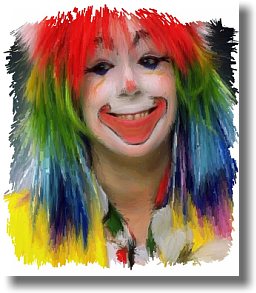
photo portrait to
artistic
face painting

|
Dragon Heads!
Gertrudis Pro &
Project
Dogwaffle
in
Perfect Harmony!
 |
winter scene
through a window
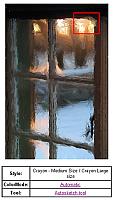
upper-right
(red
box)
detail of the above window
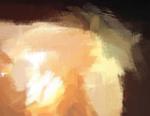
See more detail:
view dynamic zoom
|
combining
Gertrudis with
Project Dogwaffle for
added special fx and realism
like embossing, wet paint,
paper texture, stains & more...


|
|